
课程介绍&前言
此课程是天津大学智算学部大二24-25第一学期的实践课,名为《计算机系统综合实践》,主要目标是完成一个叫NEMU的模拟器,以加深《计算机系统基础》的学习。
此模拟器运行在乌邦图18.04的Linux操作系统上,模拟了cpu,dram等计算机硬件的行为。
编写此教程的目的,一方面是看到CSDN上面的教程年代久远,一些代码和思路已不再适用,另一方面为了加强自己的学习。由于此博客建立时,我已经 抄到 完成到了PA2第三阶段,故从这里开始写起,前面的应该会补上(大概)。
添加变量支持
理论
elf表示可重定位目标文件和可执行目标文件,是gcc编译器编译并链接之后的产物。

cpp:预处理(包含头文件,宏展开等)
cc1:编译(c源程序翻译为汇编程序)
as:汇编(将汇编程序翻译为机器语言)
下面是elf可重定位目标文件的格式
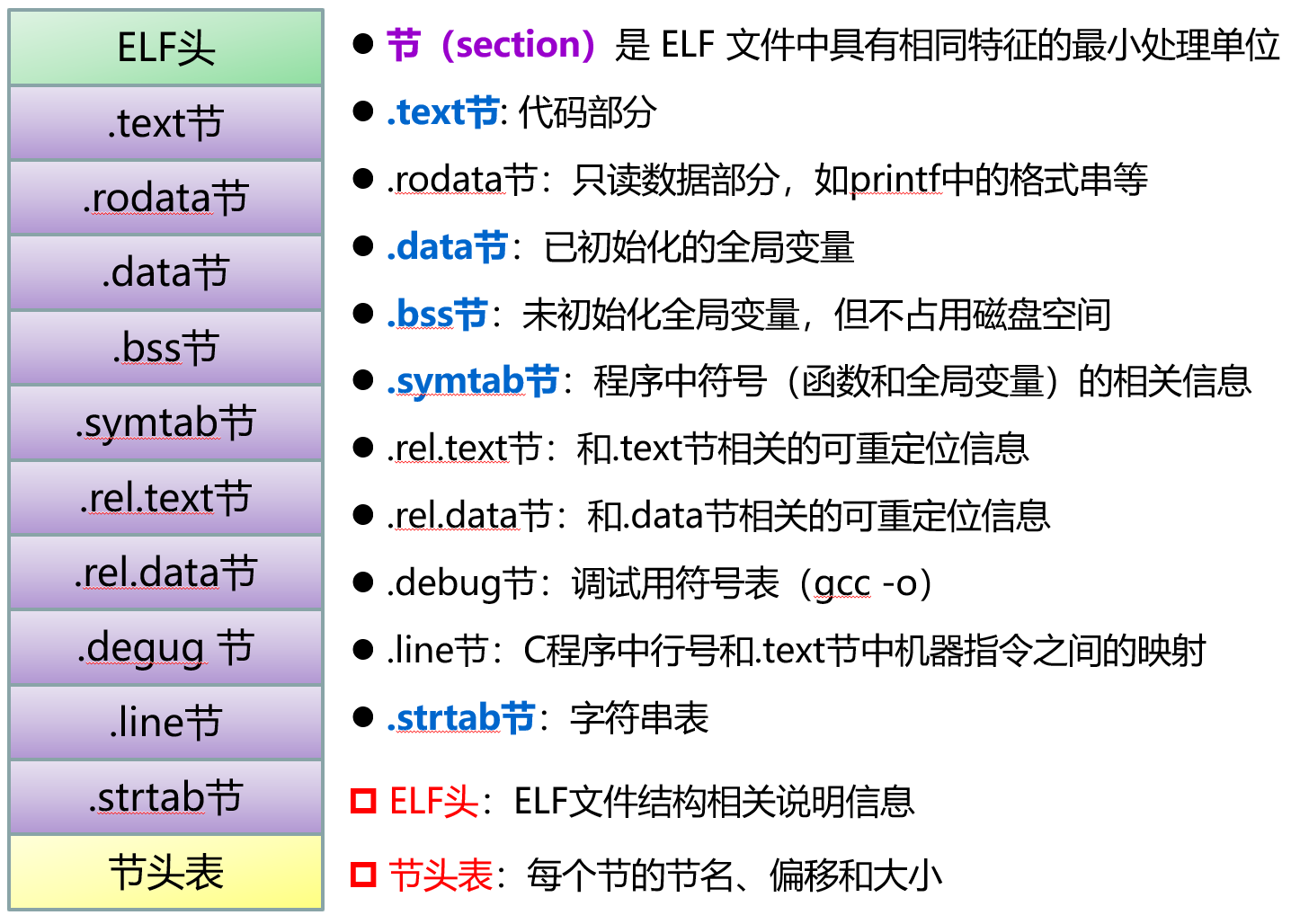
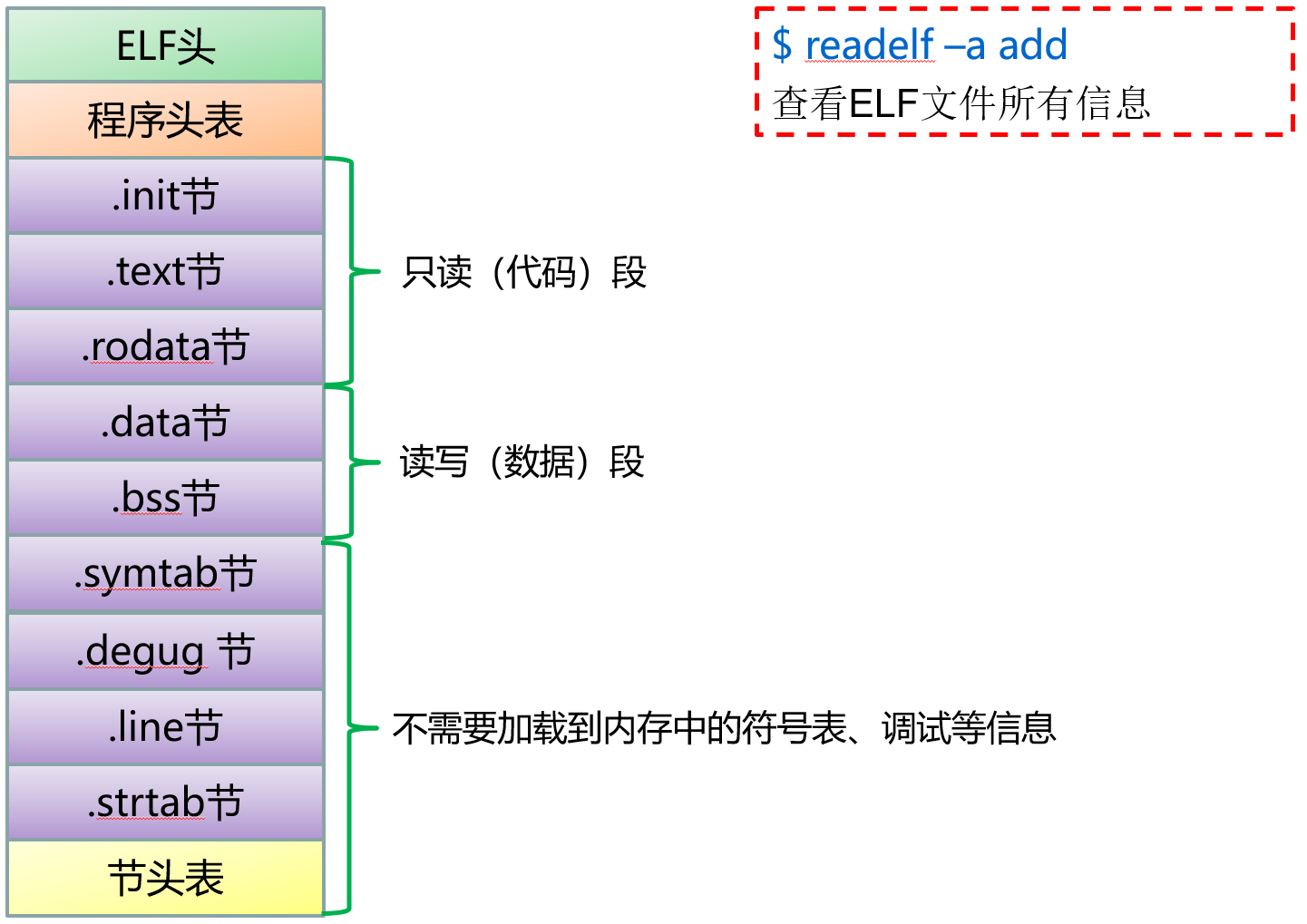
这个阶段对我们非常重要的就是symtab符号表。通过查阅指导手册对应部分,我们知道了要找OBJECT类型的变量,同时也知道了Name属性存放的是这些变量名字在字符串表(string table)中的偏移量。这是因为对于一个名字,即字符串,程序不知道要留下多大的空间存储比较合适,可能会少,也可能太多了,造成浪费,因此存储一个偏移量。
那么我们要做的,就是先从输出的Section Headers中读取.strab在elf文件的偏移是多少,然后再根据Name在.strab中的偏移量在可执行文件里面找到变量名。(变量名之间是用00隔开的,转化为符号形式就是’\0’直接读取即可,比较方便)
我们可以通过指令来查看ELF文件的16进制形式,注意在输入指令时,查看自己的当前操作目录有没有那个文件。
hd add
具体如何查找请看指导手册。这里再强调一下你看到的符号表里面没有宏和局部变量,有静态变量。这是因为局部变量时存储在栈上面的,他的地址并不固定,而且编译时期也不能确定他的地址。至于宏,在预编译时期已经处理完了,编译器看到的文件是宏展开之后的结果,静态变量是在编译时期就分配好地址的,也可以看到。
然后和你输入的
p 变量名
中的变量名对比,如果成功,打印符号表中的value即可,这里value是一个地址,想要查看变量值,只需要用PA1实现的解引用即可,如果不成功,那就用循环遍历即可。
实现
这里最难的地方应该是从ELF文件里面提取出符号表,字符串表,但是这已经给我们实现完了。
load_elf_tables()(定义在/nemu/src/monitor/debug/elf.c)用来读取符号表和字符串表,
 char *strtab = NULL;
 Elf32_Sym *symtab = NULL;
 int nr_symtab_entry;
本来有static关键字的,我为了写函数方便,直接去掉了,以便在其他文件里面访问。当然也可以在此文件里面实现,在elf.h中声明,直接调用elf.h中的函数(事实上这种方式更加安全,因为保证了封装性)。
这些变量看名字不难理解,然后我们看看Elf32_Sym是什么。(定义在\lib-common\uclibc\include\elf.h)
typedef struct
{
  Elf32_Word	st_name;		/* Symbol name (string tbl index) */
  Elf32_Addr	st_value;		/* Symbol value */
  Elf32_Word	st_size;		/* Symbol size */
  unsigned char	st_info;		/* Symbol type and binding */
  unsigned char	st_other;		/* Symbol visibility */
  Elf32_Section	st_shndx;		/* Section index */
} Elf32_Sym;

typedef uint32_t Elf32_Word;
typedef uint32_t Elf32_Addr;
typedef uint16_t Elf32_Section;

#define STT_NOTYPE	0		/* Symbol type is unspecified */
#define STT_OBJECT	1		/* Symbol is a data object */
#define STT_FUNC	2		/* Symbol is a code object */
#define STT_SECTION	3		/* Symbol associated with a section */
#define STT_FILE	4		/* Symbol's name is file name */
#define STT_COMMON	5		/* Symbol is a common data object */
#define STT_TLS		6		/* Symbol is thread-local data object*/
#define	STT_NUM		7		/* Number of defined types.  */
#define STT_LOOS	10		/* Start of OS-specific */
#define STT_HIOS	12		/* End of OS-specific */
#define STT_LOPROC	13		/* Start of processor-specific */
#define STT_HIPROC	15		/* End of processor-specific */
下面我们研究一下load_elf_tables()
void load_elf_tables(int argc, char *argv[]) {
    int ret;
    Assert(argc == 2, "run NEMU with format 'nemu [program]'");
    exec_file = argv[1];

    FILE *fp = fopen(exec_file, "rb");
    Assert(fp, "Can not open '%s'", exec_file);

    uint8_t buf[sizeof(Elf32_Ehdr)];
    ret = fread(buf, sizeof(Elf32_Ehdr), 1, fp);
    assert(ret == 1);

    /* The first several bytes contain the ELF header. */
    Elf32_Ehdr *elf = (void *)buf;
    char magic[] = {ELFMAG0, ELFMAG1, ELFMAG2, ELFMAG3};

    /* Check ELF header */
    assert(memcmp(elf->e_ident, magic, 4) == 0);		// magic number
    assert(elf->e_ident[EI_CLASS] == ELFCLASS32);		// 32-bit architecture
    assert(elf->e_ident[EI_DATA] == ELFDATA2LSB);		// littel-endian
    assert(elf->e_ident[EI_VERSION] == EV_CURRENT);		// current version
    assert(elf->e_ident[EI_OSABI] == ELFOSABI_SYSV || 	// UNIX System V ABI
            elf->e_ident[EI_OSABI] == ELFOSABI_LINUX); 	// UNIX - GNU
    assert(elf->e_ident[EI_ABIVERSION] == 0);			// should be 0
    assert(elf->e_type == ET_EXEC);						// executable file
    assert(elf->e_machine == EM_386);					// Intel 80386 architecture
    assert(elf->e_version == EV_CURRENT);				// current version


    /* Load symbol table and string table for future use */

    /* Load section header table */
    uint32_t sh_size = elf->e_shentsize * elf->e_shnum;
    Elf32_Shdr *sh = malloc(sh_size);
    fseek(fp, elf->e_shoff, SEEK_SET);
    ret = fread(sh, sh_size, 1, fp);
    assert(ret == 1);

    /* Load section header string table */
    char *shstrtab = malloc(sh[elf->e_shstrndx].sh_size);
    fseek(fp, sh[elf->e_shstrndx].sh_offset, SEEK_SET);
    ret = fread(shstrtab, sh[elf->e_shstrndx].sh_size, 1, fp);
    assert(ret == 1);

    int i;
    for(i = 0; i < elf->e_shnum; i ++) {
        if(sh[i].sh_type == SHT_SYMTAB &&
                strcmp(shstrtab + sh[i].sh_name, ".symtab") == 0) {
            /* Load symbol table from exec_file */
            symtab = malloc(sh[i].sh_size);
            fseek(fp, sh[i].sh_offset, SEEK_SET);
            ret = fread(symtab, sh[i].sh_size, 1, fp);
            assert(ret == 1);
            nr_symtab_entry = sh[i].sh_size / sizeof(symtab[0]);
        }
        else if(sh[i].sh_type == SHT_STRTAB &&
                strcmp(shstrtab + sh[i].sh_name, ".strtab") == 0) {
            /* Load string table from exec_file */
            strtab = malloc(sh[i].sh_size);
            fseek(fp, sh[i].sh_offset, SEEK_SET);
            ret = fread(strtab, sh[i].sh_size, 1, fp);
            assert(ret == 1);
        }
    }

    free(sh);
    free(shstrtab);

    assert(strtab != NULL && symtab != NULL);

    fclose(fp);
}
我们一点一点来看,首先是前面几行。
    int ret;
    Assert(argc == 2, "run NEMU with format 'nemu [program]'");
    exec_file = argv[1];

    FILE *fp = fopen(exec_file, "rb");
    Assert(fp, "Can not open '%s'", exec_file);

    uint8_t buf[sizeof(Elf32_Ehdr)];
    ret = fread(buf, sizeof(Elf32_Ehdr), 1, fp);
    assert(ret == 1);

    /* The first several bytes contain the ELF header. */
    Elf32_Ehdr *elf = (void *)buf;
    char magic[] = {ELFMAG0, ELFMAG1, ELFMAG2, ELFMAG3};
然后是Elf32_Ehdr的定义
typedef struct
{
  unsigned char	e_ident[EI_NIDENT];	/* Magic number and other info */
  Elf32_Half	e_type;			/* Object file type */
  Elf32_Half	e_machine;		/* Architecture */
  Elf32_Word	e_version;		/* Object file version */
  Elf32_Addr	e_entry;		/* Entry point virtual address */
  Elf32_Off	e_phoff;		/* Program header table file offset */
  Elf32_Off	e_shoff;		/* Section header table file offset */
  Elf32_Word	e_flags;		/* Processor-specific flags */
  Elf32_Half	e_ehsize;		/* ELF header size in bytes */
  Elf32_Half	e_phentsize;		/* Program header table entry size */
  Elf32_Half	e_phnum;		/* Program header table entry count */
  Elf32_Half	e_shentsize;		/* Section header table entry size */
  Elf32_Half	e_shnum;		/* Section header table entry count */
  Elf32_Half	e_shstrndx;		/* Section header string table index */
} Elf32_Ehdr;
exec_file为用户程序编译来的可执行文件,先打开这个文件,其中”rb”表示以二进制方式读取,然后buf表示读取文件的前面一部分,就是ELF头了。
然后是下面一部分,正如注释所说,就是检查ELF头读取有没有问题
/* Check ELF header */
assert(memcmp(elf->e_ident, magic, 4) == 0);		// magic number
assert(elf->e_ident[EI_CLASS] == ELFCLASS32);		// 32-bit architecture
assert(elf->e_ident[EI_DATA] == ELFDATA2LSB);		// littel-endian
assert(elf->e_ident[EI_VERSION] == EV_CURRENT);		// current version
assert(elf->e_ident[EI_OSABI] == ELFOSABI_SYSV || 	// UNIX System V ABI
        elf->e_ident[EI_OSABI] == ELFOSABI_LINUX); 	// UNIX - GNU
assert(elf->e_ident[EI_ABIVERSION] == 0);			// should be 0
assert(elf->e_type == ET_EXEC);						// executable file
assert(elf->e_machine == EM_386);					// Intel 80386 architecture
assert(elf->e_version == EV_CURRENT);				// current version
下面几行是读取section header table,它的作用是看string table的偏移量,以便在ELF文件中找到string table.
fseek是c语言的一个函数,用于移动文件指针到指定位置,这里就是把指针(fp)移到以SEEK_SET为基准,偏移量为elf->e_shoff的地方,而SEEK_SET是一个宏定义,为0,所以意思就是移动到section header table的开始位置。
fread用于读取数据,就是把section header table读取到sh指向的区域,一共读取sh_size个。
ret用于检验读取是否成功。
/* Load section header table */
uint32_t sh_size = elf->e_shentsize * elf->e_shnum;
Elf32_Shdr *sh = malloc(sh_size);
fseek(fp, elf->e_shoff, SEEK_SET);
ret = fread(sh, sh_size, 1, fp);
assert(ret == 1);
下面是Elf_Shdr的定义:它的类型是Section Table
typedef struct
{
  Elf32_Word	sh_name;		/* Section name (string tbl index) */
  Elf32_Word	sh_type;		/* Section type */
  Elf32_Word	sh_flags;		/* Section flags */
  Elf32_Addr	sh_addr;		/* Section virtual addr at execution */
  Elf32_Off	sh_offset;		/* Section file offset */
  Elf32_Word	sh_size;		/* Section size in bytes */
  Elf32_Word	sh_link;		/* Link to another section */
  Elf32_Word	sh_info;		/* Additional section information */
  Elf32_Word	sh_addralign;		/* Section alignment */
  Elf32_Word	sh_entsize;		/* Entry size if section holds table */
} Elf32_Shdr;
下面的代码好好思考一下就能看懂,elf是ELF头,它里面有一个信息,就是e_shstrndx,即string table的索引值,然后sh[]就是在Section Table中找到了string table.
结合上面section table中的定义,不难想到sh[elf->e_shstrndx].sh_size就是string table的大小,而sh[elf->e_shstrndx].sh_offset就是string table的偏移量。
然后就是读取的string table存入shstrtab,这是一个字符串。注意前面理论我们说了不同的Name是用00也就是’\0’隔开的,这里直接把整个表读入,也包括了00,你要是直接打印shstrtab是不会打印完整的
注意这里的string table 是section header的,我们需要的整个程序的string table还没有读取。
/* Load section header string table */
char *shstrtab = malloc(sh[elf->e_shstrndx].sh_size);
fseek(fp, sh[elf->e_shstrndx].sh_offset, SEEK_SET);
ret = fread(shstrtab, sh[elf->e_shstrndx].sh_size, 1, fp);
assert(ret == 1);
然后接下来读取symbol table.
sh[i].sh_type == SHT_SYMTAB就是从section table中找到symbol table那一项。
strcmp(shstrtab + sh[i].sh_name, “.symtab”) == 0就是再检查一遍是不是真的symbol table ,sh[i].sh_name是各个选项在string table中的索引值。
如果检查成功,就加载symbol table,存入symtab
如果检测的是string table,那就加载到strtab
int i;
for(i = 0; i < elf->e_shnum; i ++) {
    if(sh[i].sh_type == SHT_SYMTAB &&
            strcmp(shstrtab + sh[i].sh_name, ".symtab") == 0) {
        /* Load symbol table from exec_file */
        symtab = malloc(sh[i].sh_size);
        fseek(fp, sh[i].sh_offset, SEEK_SET);
        ret = fread(symtab, sh[i].sh_size, 1, fp);
        assert(ret == 1);
        nr_symtab_entry = sh[i].sh_size / sizeof(symtab[0]);
    }
    else if(sh[i].sh_type == SHT_STRTAB &&
            strcmp(shstrtab + sh[i].sh_name, ".strtab") == 0) {
        /* Load string table from exec_file */
        strtab = malloc(sh[i].sh_size);
        fseek(fp, sh[i].sh_offset, SEEK_SET);
        ret = fread(strtab, sh[i].sh_size, 1, fp);
        assert(ret == 1);
    }
}
后面就是释放掉不需要的内存了。这个函数我们只要明白什么功能就够了,不用明白咋读的,看的我有点难受。
至此,我们就明白了怎么使用以下三个,来查找变量了
 char *strtab = NULL;
 Elf32_Sym *symtab = NULL;
 int nr_symtab_entry;

typedef struct
{
  Elf32_Word	st_name;		/* Symbol name (string tbl index) */
  Elf32_Addr	st_value;		/* Symbol value */
  Elf32_Word	st_size;		/* Symbol size */
  unsigned char	st_info;		/* Symbol type and binding */
  unsigned char	st_other;		/* Symbol visibility */
  Elf32_Section	st_shndx;		/* Section index */
} Elf32_Sym;

typedef uint32_t Elf32_Word;
typedef uint32_t Elf32_Addr;
typedef uint16_t Elf32_Section;
我的思路是在nemu/src/monitor/debug/expr.c中实现,直接访问这三个,才把static去掉了。
我首先在enum中再添加一个变量OBJECT来指定type的值为变量值
enum {
    NOTYPE = 256,NUMBER = 6,EQ = 2,ZUO = 3,YOU = 4,REG = 5,HEX = 1,NOTEQ = 7,AND = 8,OR = 9,NOT = 10,FU = 11,JIE = 12,OBJECT = 13,
    /* TODO: Add more token types */
};
然后在rules中添加规则:
{"[a-zA-Z_][a-zA-Z0-9_]*", OBJECT},
注意这个一定要先提取NUMBER,再提取HEX否则可能会有问题。
make_token()中就按照前面添加即可,我在最后面贴出我的代码。
接下来我是在expr()里面实现的,for循环遍历,如果识别到了OBJECT,那就找变量,把变量给tokens成员str[],把type改成NUMBER,然后计算即可,如果没有找到,就直接return 0 ,报告错误。我这么写是不想直接结束程序,不然万一打错一个字,程序结束了,还要从头开始单步执行跳过,有点难受。不过要是直接结束程序,用panic()也没有什么不妥。
for (i = 0; i < nr_token; i++) {
        if (tokens[i].type == OBJECT) {
            char temp_qaq[32];
            strncpy(temp_qaq, &tokens[i].str[0], how_long_x[num_x]);
            temp_qaq[how_long_x[num_x++]] = '\0';
            int qwq = 0;
            bool pipei = false;
            for (; qwq < nr_symtab_entry; qwq++) {
                if ((symtab[qwq].st_info & 0xf) == STT_OBJECT){
                    char tmp[30];
                    int tmplen = symtab[qwq + 1].st_name - symtab[qwq].st_name - 1;
                    strncpy(tmp, strtab + symtab[qwq].st_name, tmplen);
                    tmp[tmplen] = '\0';
                    if (strcmp(temp_qaq, tmp) == 0) {
                        pipei = true;
                        tokens[i].type = NUMBER;
                        long long object_ = symtab[qwq].st_value;
                        sprintf(tokens[i].str, "%lld", object_);
                        break;
                    }
                }
            }
            if (!pipei) {
                printf("wrong name!");
                return 0;
            }
        }
    }
我首先把变量的那个字符串复制到了temp_qaq[]数组,并在最后添加’\0’。STT_OBJECT是一个宏定义,为1。tem为symbol table中的变量名复制到的数组。
如果找到OBJECT类型的token,那就遍历symbol table,找可以匹配的变量即可。
这是我的作业远程仓库(链接等这一届完事再给),NEMU全部作业都在这里。
补充
2024.9.13
尝试运行了一下学校上自动评测的样例:以obj/testcase/add为ENTRY,运行指令:
p *(test_data + 12)
发现程序出现了缓冲区溢出的运行时错误,通过定位错误,发现是expr中处理token类型为OBJECT时有错误
就是上边的for循环,当识别出symtabl中的类型是STT_OBJECT之后的处理不当。
int tmplen = symtab[qwq + 1].st_name - symtab[qwq].st_name - 1;
这一行如果qwq此时就是symtabl中的最后一个,那么symtab[qwq + 1].st_name的值就是0,因此会造成tmplen < 0,导致溢出(因为strncpy的函数原型中的那个长度n是一个无符号整型,传入负值,将会自动类型转换为一个很大的无符号数,这是因为有符号数使用的是补码编码)。
我的解决方法是,既然这些Name在string table中已经用’\0’隔开了,那么我们不妨就不用再用char数组了,直接用char*
char *tmp;
tmp = strtab + symtab[qwq].st_name;
这样if (strcmp(temp_qaq, tmp) == 0)也可以正常运行。